




本文最后更新于:
相信大家在使用子比主题时也遇到过这种问题,保存子比主题时突然弹出一个提示框:function(){return u(n),r.apply(this,arguments)},但是按照子比所给出的方法又无法解决,这边分享一下蛙言网的经验。
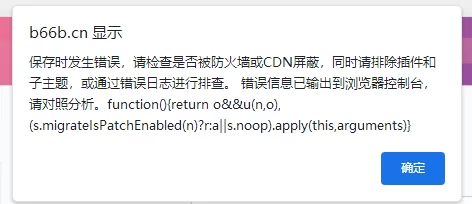
子比官方给出的解决办法:关闭防火墙
今天讲一下,关闭了防火墙依旧解决不了怎么办?
- 首先进入 宝塔面板—日志—查看网站日志—异常日志—是否和下面的内容类似
- 可搜索关键词bytes
026/07/04 14:21:25 [error] 20632#0: *740493 FastCGI sent in stderr: "; PHP message: PHP Fatal error: Allowed memory size of 134217728 bytes exhausted (tried to allocate 12328960 bytes) in /www/wwwroot/b66b.cn/wp-content/object-cache.php on line 2525" while reading upstream, client: 123.88.246.155, server: b66b.cn, request: "POST /wp-admin/admin-ajax.php HTTP/2.0", upstream: "fastcgi://unix:/tmp/php-cgi-83.sock:", host: "b66b.cn", referrer: "https://b66b.cn/wp-admin/admin.php?page=zibll_options"解决办法:
蛙言网 B66B.CN,转载请注明原文地址:https://b66b.cn/8377.html
付费阅读








THE END










![[子比主题美化]LV等级&VIP会员图标分享-蛙言网](https://vip.helloimg.com/images/2023/11/27/o0cUjh.png)













请登录后查看评论内容